Quick answer: Set up Family Center, restrict DMs to friends only, and lock content filtering on. These three settings make Discord significantly safer for teens 13+. The biggest gap is voice chat: it leaves no log and no parental control tool can monitor it on mobile.
Discord is where gaming conversations go when they leave the game. If your child plays Roblox, Fortnite, or Minecraft with friends, there's a decent chance they're already on Discord or being asked to join.
The platform has made real improvements to teen safety in 2026, including new default settings and a Family Center tool that gives parents some visibility. But Discord's voice channels and direct messages remain areas where parental controls have limits, and where predators know to operate.
This guide covers what Discord actually is, why it's the platform parents should pay the most attention to, how to set up Family Center, and what monitoring tools can and can't do.
Do this first: 5-minute Discord safety checklist
Check if Discord is on their device. Open Screen Time (iPhone) or Family Link (Android) and look for Discord in the app list. Children sometimes hide it in folders. If it's there and you didn't know, that's your starting point.
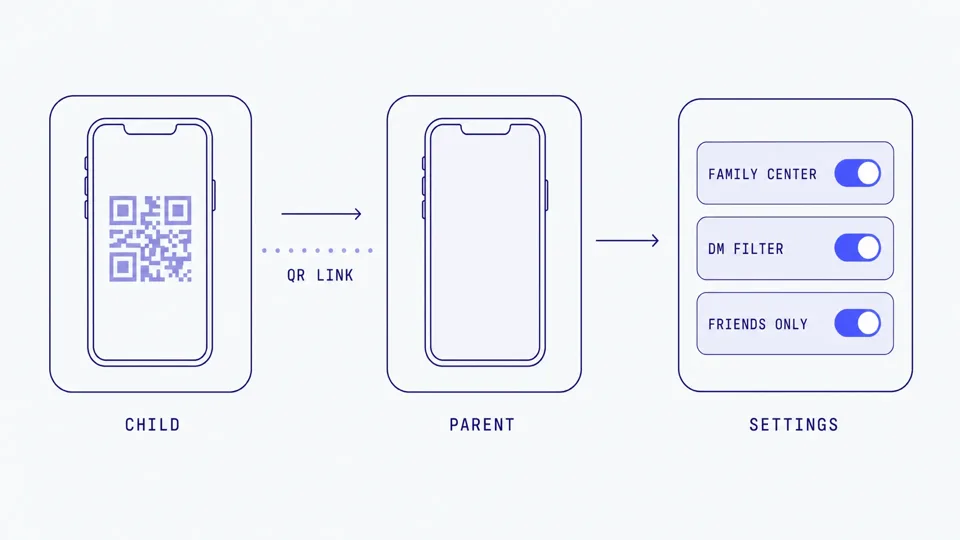
Set up Family Center (Settings, then Family Center, then scan the QR code from your child's device).
Check their Privacy and Safety settings: DMs from server members should be off or filtered.
Review their server list. Do you recognize the server names? Ask about any that look unfamiliar.
Have a 30-second conversation: "If anyone from a game asks you to move to Discord, or sends you a friend request you don't expect, let me know."
What Discord actually is (for parents who have never used it)
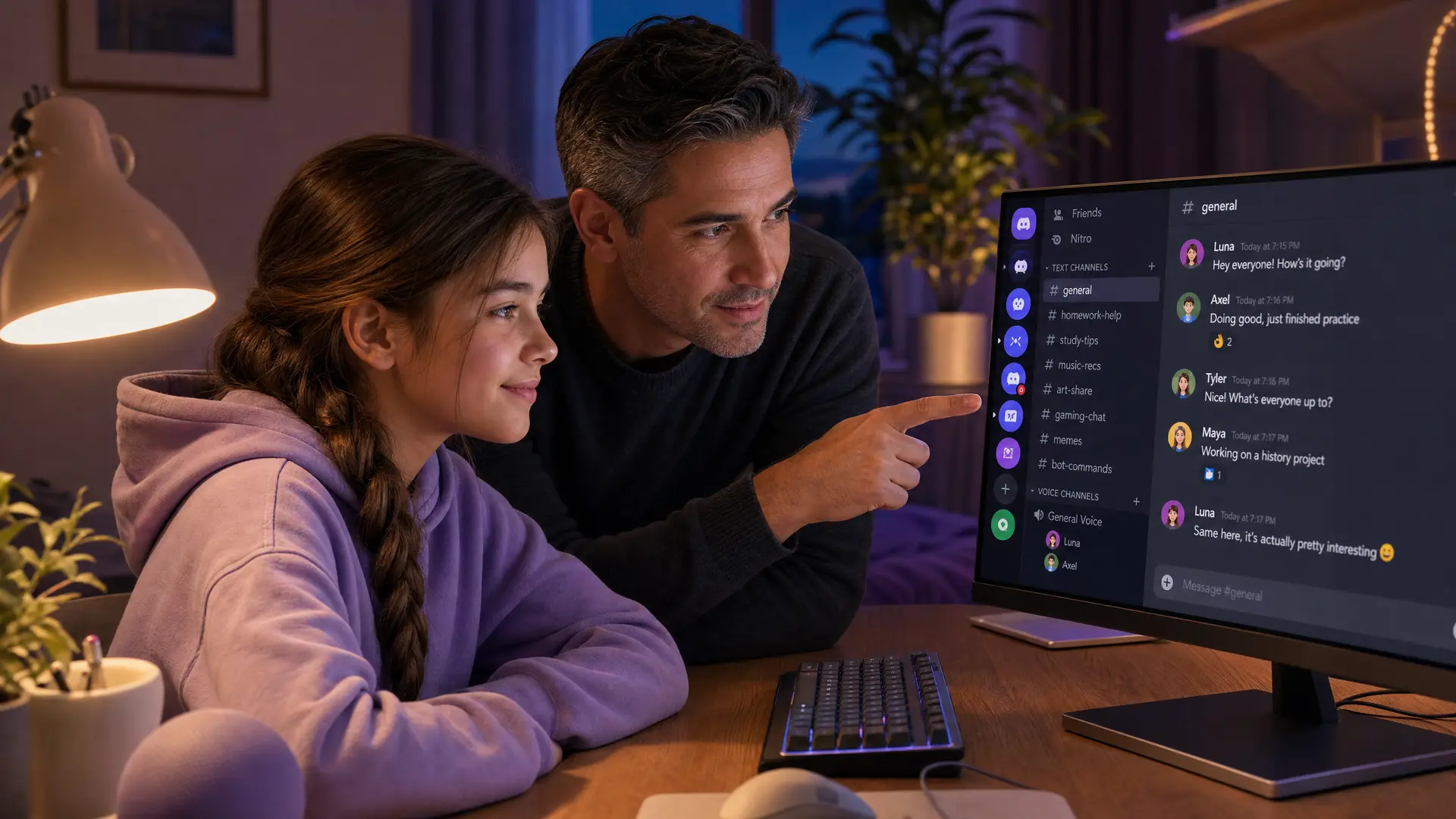
Discord is a messaging platform where people communicate through text, voice, and video. It was built for gamers but now covers everything from homework groups to fan communities.
The key concepts:
Servers: community spaces organized around a topic (a game, a school, a hobby). Anyone can create one. They can be public or private.
Channels: sections within a server. Text channels for typing. Voice channels for talking. Some servers have dozens of each.
DMs (direct messages): private one-on-one or group conversations outside of any server.
Voice channels: join one, and you're in a live audio call with whoever else is in that channel. No recording. No transcript. No log.
Video and screen share: available in DMs and voice channels.
The minimum age for Discord is 13. Discord requires age verification, but determined children can get around it.
Why Discord is the platform parents should watch most closely
Discord isn't usually where the problem starts. The pattern child safety researchers have documented goes like this:
A child plays Roblox, Fortnite, or another game with public chat.
Someone in the game builds rapport: helps with quests, sends gifts, is friendly.
They say: "Add me on Discord."
The conversation moves to Discord DMs or a private voice channel.
With less moderation and more privacy, grooming escalates.
This is why multiple state attorneys general have investigated Discord. Florida's AG launched a civil investigation in 2026 over child safety concerns, and New Jersey filed a civil complaint alleging deceptive safety claims and inadequate moderation.
Discord's own child safety policy states a zero-tolerance approach to child exploitation, with permanent bans on first offense. But enforcement relies on detection, and voice conversations leave no trail for automated systems to scan after the fact.
For a focused look at the voice-specific risks and what parents can do about them, see our Discord voice chat safety guide.
How voice works on Discord (and why it matters)
Voice on Discord works differently from a phone call. There are two main ways children use it:
Voice channels in servers: Your child joins a channel and talks to whoever else is there. In a gaming server, this might be 5-50 people. Voice is live, spatial in some cases, and there is no recording or transcript. When the conversation is over, it's gone.
Voice/video calls in DMs: Your child calls someone directly. This is private, one-on-one (or small group), and completely invisible to server moderators. No logs exist.
For parents, the key fact is this: Discord voice conversations leave no evidence. There's no chat log to scroll back through, no recording to review, no text for a monitoring app to scan. If something concerning happens in a voice channel or DM call, you won't know unless your child tells you.
This is the blind spot that predators exploit. And it's the reason voice chat monitoring is a separate problem from text monitoring.
What changed in 2026
Discord rolled out significant safety updates beginning in March 2026:
Teen-by-default settings (global since March 2026):
Every account is now treated as a teen unless the user verifies they are 18 or older
Sensitive media (sexually explicit or violent content) is filtered automatically
DMs from unknown users are routed to a separate request inbox
Friend requests from unfamiliar users trigger a warning prompt
Age-restricted channels, servers, and commands are blocked
Teens cannot modify content filters or message request settings
Family Center updates (2026):
Parents can see: servers joined, friends added, total call minutes, top 5 users and servers, purchases
2026 additions: activity dashboard with weekly trends, contact controls for managing who can DM the teen, and report notifications when a teen files a safety report
Parents cannot see: message content, what was said in voice calls, specific DM conversations
Parents can manage some privacy settings: who can DM the teen, sensitive content filtering
Age verification:
Discord's current age assurance vendor is Incode (replacing Persona), with k-ID as the orchestration partner
Verification options include on-device facial age estimation (biometric data never leaves the phone; Discord receives only an age band), government ID upload, or credit card
Over 90% of users will never be asked to verify; it is triggered when account signals suggest a mismatch
Currently live in the UK, Australia, and Brazil; global rollout expected in the second half of 2026
What this means in practice: the defaults are better than before. But Family Center is a visibility tool, not a monitoring tool. It shows you high-level activity. It doesn't show you what was said, and it can't hear voice calls.
The real risks on Discord
Grooming patterns
Predators use Discord because it offers private, unmonitored spaces. The documented pattern:
Friend request from someone met in a game
DM conversation that starts casual and builds trust
Voice call where the relationship deepens (voice feels more personal and intimate than text)
Isolation: "Don't tell your parents," "This is just between us"
Escalation: requests for photos, personal information, or meeting in person
Discord's DM filtering for minors does not screen messages from "friends," and predators build friend status first. This is the gap that researchers and regulators have flagged repeatedly.
Law firms handling these cases describe a recurring pattern: a child groomed on a game like Roblox and later harmed after communications continued on Discord. The Social Media Victims Law Center reports that "private servers enable predators to talk to children through text, voice, or video chat."
What children share in voice calls
The same dynamic as other voice platforms: in the flow of conversation, children share real names, school details, location, and personal information they'd never type. Voice feels safe. It feels like talking to a friend. It doesn't feel like something that could be dangerous.
Private servers: both the risk and the solution
A private server run by your child and their school friends is one of the safest ways to use Discord. A private server run by someone they met in a game is one of the riskiest. The difference is who controls access and who's in it.
Ask your child: "Who runs this server? How did you find it? Do you know these people in real life?"
Step-by-step: setting up Discord Family Center
From your teen's device:
Open Discord, go to User Settings
Scroll to Family Center, tap Enable Family Center
A QR code appears on screen
From your device:
Open Discord on your phone (create an account if you don't have one)
Go to User Settings, then Family Center
Select Connect with Guardian and scan the QR code
Your teen accepts the connection request
Once linked, you'll see:
Activity summaries (servers, friends, calls, purchases)
Weekly email recaps
Ability to manage some privacy and safety settings
Other settings to check
Privacy and Safety: set DMs from server members to off or filtered
Friend Requests: restrict to Friends of Friends or Server Members (not Everyone)
Sensitive Content: keep the filter on (Discord blurs content flagged as sensitive by default for teens)
For a verdict on whether Discord is safe at each age from 10 to 16, including what settings can and cannot show you, see our complete Discord safety guide by age.
Should your child be on Discord?
Under 13
No. Discord's minimum age is 13, and the platform is not designed for younger children. The risks (public servers, voice channels, DMs from strangers) are too high for this age group. If your child's friends are on Discord, encourage them to use safer alternatives for group chat (like a family-controlled messaging app) until they're older.
You can block Discord entirely using Apple Screen Time (Settings, then Screen Time, then Content and Privacy Restrictions, then Allowed Apps) or Google Family Link (App Limits). This prevents installation or hides the app.
If they're already on Discord under 13, sit down with them, review the account together, and consider whether to keep it active with strict settings or remove it.
Ages 13-15
With guardrails. Family Center should be set up. Settings should be locked down (DMs restricted, content filtering on). Review the server list together. Have the conversation about what to watch for.
Key risk at this age: social pressure to join public servers that expose them to adults. Encourage private servers with real-life friends.
Ages 16+
With awareness. Teens this age have more autonomy, but should still know how predators operate and what grooming looks like. Family Center can still provide visibility even at this age.
Can you monitor Discord?
Tool | What it does on Discord | Platform | Limitation |
|---|---|---|---|
Apple Screen Time / Google Family Link | Nothing (app blocking and time limits only) | iOS, Android | Can block Discord or limit hours. Cannot see content, messages, or voice. |
Discord Family Center | Activity summaries (servers, friends, calls) | All | Cannot see message content or voice calls |
Bark | Text chat in DMs (Android only) | Android | No voice monitoring. No iOS Discord support. |
BrightCanary | Typed text on Discord (iOS) | iOS | Monitors what your child types, not what they receive. No voice. |
Halo | Monitors Discord voice chat on Mac and Windows. Sends you an alert when it detects grooming, bullying, or threats. Not general chat or swearing. | Mac, Windows | Alerts for grooming, bullying, and threats in Discord; desktop only, not iOS (Apple VoIP limitation). |
The honest picture: No tool gives you full visibility into Discord. Family Center shows activity but not content. Text monitoring tools cover typed messages on specific platforms. Voice calls are the hardest to monitor because Discord's architecture doesn't expose them to third-party apps on mobile.
On Mac and Windows, Halo monitors Discord voice chat. It sends you an alert when it detects grooming, bullying, or threats. Not general chat or swearing. Their voice never leaves their device. Only the words are analysed, then discarded. Never stored. You get a summary, not a recording. On iOS, Apple's platform restrictions prevent any app from accessing Discord's VoIP audio.
What to say to your child about Discord
Ages 11-12 (if they're asking to join)
"Discord is designed for people 13 and older. A lot of the people on there are adults. Let's wait."
"If your friends are on Discord, you can still play games together without it. Let's find a way."
"I'm not saying never. I'm saying not yet."
Ages 13-14
"If someone from a game sends you a friend request on Discord, ask yourself: do I know this person in real life? If not, be careful."
"Voice channels feel casual, but there's no way to go back and check what was said. If someone says something that makes you uncomfortable, tell me."
"I've set up Family Center so I can see the big picture. I'm not reading your messages. I just want to know you're in safe spaces."
Ages 15+
"You know how to use Discord. Just remember: predators target teens, not just little children. If someone's getting personal fast or pushing you to talk privately, that's a pattern."
"If something happens that you're not sure about, I'd rather hear it from you."
Frequently asked questions
Is Discord safe for kids?
Discord has made real safety improvements in 2026 with teen-by-default settings and Family Center. But the platform's voice channels, DMs, and private servers still carry risks, especially for unsupervised children. With the right settings and parental awareness, teens 13+ can use Discord more safely, but it requires active involvement.
What age should kids be allowed on Discord?
Discord's minimum age is 13. Most child safety experts recommend parental guidance for teens under 16 due to Discord's open nature. For children under 13, the risks outweigh the benefits.
Can parents see Discord messages?
Not through Discord itself. Family Center shows activity summaries (servers, friends, call minutes) but not message content. Third-party tools like Bark (Android) and BrightCanary (iOS) can monitor some typed text, but no tool monitors Discord voice calls on mobile.
How do predators use Discord?
The typical pattern starts in a game (Roblox, Fortnite), moves to Discord via a friend request, escalates through DMs and voice calls, and involves isolation tactics ("keep this between us"). Discord's DM filtering doesn't screen messages from "friends," which predators exploit by building friend status early.
Can Bark monitor Discord?
Bark monitors Discord text chat in direct messages on Android devices. It does not monitor Discord on iOS, and it does not monitor voice calls or voice channels on any platform.
Can parents see Discord text messages?
Not through Discord itself. Family Center shows activity summaries but not message content. Bark monitors DM text on Android, and BrightCanary monitors typed text on iOS. Neither shows the full conversation or received messages. For the complete breakdown, see our guide to whether parents can see Discord messages.
Should I let my 12-year-old use Discord?
Discord's minimum age is 13 for a reason. If your 12-year-old's friends are all on Discord, acknowledge the social pressure but explain that the platform has risks designed for older users to navigate. Offer alternatives for group communication until they're 13, then set up with strict guardrails from day one.
Sources
[Discord] "Family Center for Parents and Guardians." support.discord.com (updated April 2026)
[Discord] "Teen and Child Safety Policy Explainer." discord.com/safety
[Discord] "Getting Global Age Assurance Right." February 2026. discord.com
[Discord] "Age-Assurance Update FAQ." support.discord.com
[Florida AG] "Florida AG launches civil investigation into Discord over child safety concerns." 2026. mysuncoast.com
[Social Media Victims Law Center] "Discord Lawsuits for Teen Harm." socialmediavictims.org
[Hilliard Law] "How Predators Exploit In-Game Chat, Discord & External Apps." February 2026.
[Amherst Indy] "What Parental Control Apps Miss That Predators Exploit." March 2026.
[Thorn] "2024 Youth Perspectives on Online Safety." thorn.org
[NSPCC] "Online grooming crimes against children increase by 89%." 2024. nspcc.org.uk
[ConnectSafely] "Parent's Guide to Discord." April 2025. connectsafely.org
[BrightCanary] "Is Discord Safe? A Parent's Guide." February 2026. brightcanary.io