Quick answer: You can't get voice chat on Roblox for a genuine under-13. Since January 2026 Roblox requires an age check to chat, and voice is limited to users verified as 13 or older. Children only get around it by faking a birthday, passing the face scan, or borrowing an older account. Keep the registered age accurate and voice turned off.
If you searched "how to get voice chat on Roblox under 13," you probably have a child asking why their friends can talk in-game and they can't. The honest answer is that Roblox made voice chat a 13-plus feature on purpose, and there is no legitimate switch that turns it on for a younger account.
That leaves two real questions. Why is it gated this way, and what should you do when your under-13 tries to work around it? This guide answers both, explains exactly how the 2026 age check works, and shows you how to lock voice chat off so it stays off.
Key takeaways
Roblox voice chat requires an age check confirming the user is 13 or older. Under-13 accounts cannot enable it.
The three workarounds children use are a fake birth year, passing the face scan by looking older, and using an older person's account.
Faking the age is worse than losing voice chat. It moves your child into an older band where Roblox allows contact with older teens and adults.
The safest setup is an accurate birth date, voice chat set to No one, and a Parental PIN so your child can't switch it back.
Turning off voice is not the whole job. Text chat still reaches 9 to 12 year olds, and that is where most luring starts.
Do this first: 5-minute lockdown
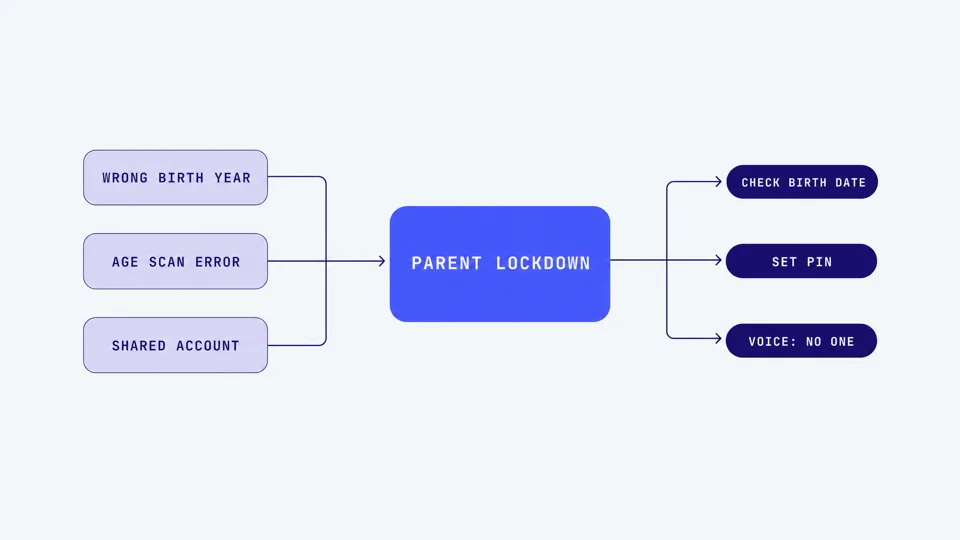
Log into your child's Roblox account and open Settings, then Parental Controls.
Set a 4-digit Parental PIN your child does not know.
Check the account's registered birth date. If it shows 13+ but your child is younger, that is the root problem. Fix it.
Under Communication, set Experience Voice Chat and Party Voice Chat to No one.
Set text chat to Friends only, then review the friends list and ask about anyone you don't recognize.
That covers the immediate risk. The rest of this guide explains why each step matters and what to say when your child pushes back.
Why under-13s can't get voice chat
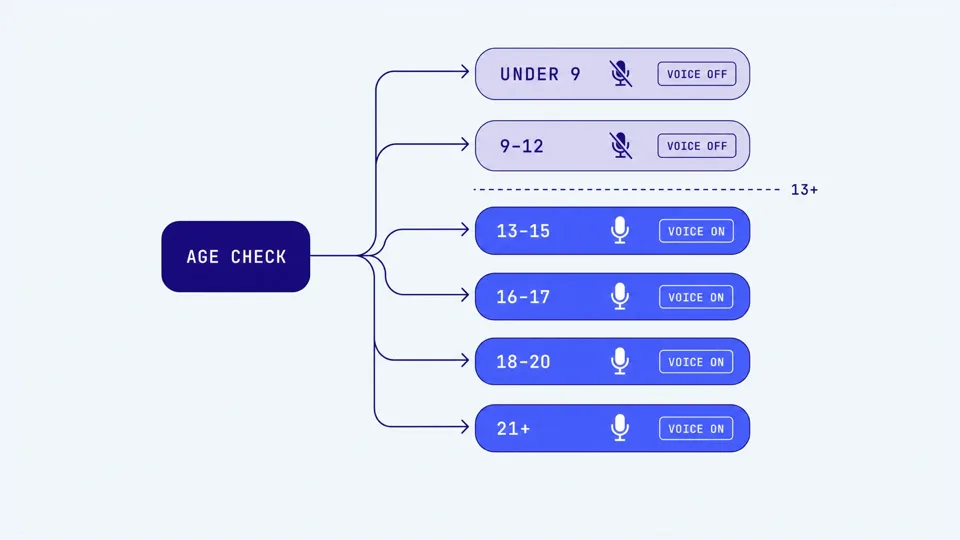
In January 2026 Roblox made an age check mandatory before any user can access chat, worldwide. This applies to text, party, and voice chat alike. No age check means no communication features at all.
The check uses facial age estimation run by a vendor called Persona. The camera scans the user's face, estimates an age band, and deletes the image immediately. Users 13 and up can instead verify with a government ID. Once checked, everyone is sorted into one of six age groups: under 9, 9 to 12, 13 to 15, 16 to 17, 18 to 20, and 21 plus.
Voice chat only unlocks for users placed at 13 or older. A child in the under-9 or 9-to-12 band simply does not see a working voice option. This is not a setting a parent can override to be more permissive. It is a hard floor Roblox built to satisfy regulators and to reduce the number of young children talking to strangers in real time.
There is a reason to trust the intent here even if the execution is imperfect. The age-based system is designed to stop children younger than 16 from being contacted by adults. Voice chat inside a public lobby is the loudest, most immediate way an adult could reach a child, so it makes sense that Roblox drew the line there. For a fuller walkthrough of every Roblox chat setting, see our Roblox voice chat safety guide.
How children try to get around the age check
When a younger child really wants voice chat, they usually try one of three things. Knowing each one tells you exactly what to check.
Faking the birthday
The oldest trick is entering an older birth year when creating the account. If a 10-year-old typed in a birthday that makes them 15, Roblox treats the account as a teen and offers voice chat. This often happened years ago and gets forgotten, so the account age quietly no longer matches the child. Open the account settings and check the registered birth date against reality.
Passing the face scan
Facial age estimation is good but not exact. The independent Age Check Certification Scheme measured a mean error of about 1.4 years for under-18s, which means a tall, mature-looking 11 or 12 year old can occasionally be estimated as 13. Roblox layers on behavioral signals to catch mismatches, but the scan alone is beatable by children who read as older than they are.
Using an older account
The most common workaround in practice is borrowing an already-verified account. An older sibling, a cousin, or a parent completes the age check on a shared device, and the younger child logs in to that profile to get voice. Roblox has no way to know a different person is now holding the phone. If several people share one tablet or console, assume this is possible and check who is signed in.
Notice that none of these are things Roblox "allows." They are ways of defeating a safety control, which is why the fix is not to grant voice chat but to close the gap.
Why faking the age is worse than no voice chat
It is tempting to think the only cost of a fake birthday is that your under-13 gets to talk in games a bit early. The real cost is bigger. The age check does not just unlock voice, it decides which other users your child is allowed to communicate with at all.
By default each age group can chat with the groups directly above and below it. A genuine 10-year-old, correctly placed in the 9 to 12 band, can only be reached by under-9s, other 9 to 12s, and 13 to 15s. Push that same child up to a fake 15, and they land in the 13 to 15 band, which opens contact with 16 and 17 year olds. Every fake year added widens the pool of older strangers who can message them. Defeating the age check removes the one protection specifically built to keep under-16s away from adults.
This matters because the risks on Roblox are documented and serious. Roblox has roughly 130 million daily users, and in 2024 the platform submitted 24,522 reports of suspected child exploitation to the National Center for Missing and Exploited Children. As of mid-2026 more than 160 child sexual exploitation lawsuits have been consolidated into a single federal case (MDL 3166), and Roblox has settled child-safety cases with several US states, including a $12.5 million agreement with Nevada in April 2026. Thorn's 2024 research found that one in three boys aged 9 to 12 reported having an online sexual interaction, with perpetrators increasingly targeting younger boys. These are the reasons the age band exists, and the reason not to help a child climb out of it.
What to do instead: lock voice off and keep it off
If your child is genuinely under 13, the goal is simple. Make the registered age accurate, set voice to No one, and put a PIN on it so the settings stick.
Fix the account age
If the birth date shows your under-13 as older, that is the first thing to correct. If you have linked a parent account (see below), you can update your child's age from the parent dashboard. Otherwise, an account holder can edit the birthday under Settings, then Account Info, but Roblox limits how often this can be changed and won't let you push an already-verified account below 13 on your own. If the field is locked or the change is blocked, submit a request through Roblox Support (Support > Age or Birthday correction) with proof of the child's real age, and they will reset it.
Set a Parental PIN
Go to Settings, then Parental Controls, and create a 4-digit PIN your child does not know. Without a PIN, every restriction you set can be undone from the same menu in seconds. The PIN is what turns your settings from suggestions into locks.
Turn voice off
Under Communication, set Experience Voice Chat and Party Voice Chat to No one. For a true under-13 these should already be unavailable, but setting them explicitly protects you if the account age ever drifts.
Link a parent account
Roblox now supports parent account linking with ID or credit-card verification. Once linked, communication controls live on your account rather than your child's, so they cannot quietly change them. This is the strongest version of the lockdown and worth the few minutes it takes.
Don't forget text
Voice gets the attention, but 9 to 12 year olds still have filtered text chat, and that is where luring usually begins. Set text to Friends only, never Everyone, and review the friends list together. The single biggest red flag to watch for is someone asking your child to move the chat to another app like Discord or Snap.
Where a safety layer fits, honestly
Parental controls let you block and restrict, but they do not give you any warning if something goes wrong in a conversation. If your child is under 13 and voice is off, that is mostly fine. The exposure appears once a child is 13-plus with voice enabled, or on a shared PC where an older account is in use.
Tool | What it does on Roblox | Platform | Limitation |
|---|---|---|---|
Roblox parental controls | Block or restrict chat only | All | No visibility into what's said |
Bark | Text chat (child's side, Android) | Android only | No voice, text is one-sided |
Aura / Kidas | Voice and text on PC games | Windows only | No mobile, cloud processing |
Halo | In-game voice chat | iOS, Mac, Windows | No Android yet, iOS needs a manual session |
Halo is a gaming safety app for iPhone, iPad, Mac and Windows, US$99.99 a year or US$12.99 a month, with a 7-day free trial. Halo sends you an alert when it detects grooming, bullying, or threats in your child's game. It monitors the voice chat and the text chat. Their voice never leaves their device. Only the words are analysed, then discarded. Never stored. You get a summary, not a recording. On iOS the supported surface is Roblox voice during a manually started session. On Mac and Windows it can pick up Discord and other VoIP voice running on that computer. It monitors the voice chat and the game's on-screen text chat while recording nothing, it doesn't read DMs, it doesn't cover console voice, and there is no Android version yet, treat it as one layer, not a guarantee. For a genuine under-13 with voice correctly turned off, you don't need it. It becomes useful once your child turns 13, enables voice, and you want a safety net rather than blanket blocking. To compare every option across platforms, read our voice chat safety guide. If you're weighing how that on-device approach differs from cloud tools, our guide on on-device vs cloud voice chat monitoring breaks it down.
What to say to your child
When they ask why they can't have voice chat
"Roblox only lets people your friends' age and up use the talking feature. It's a rule they made, not one I made up."
"When you're old enough we can turn it on together and I'll show you how to stay safe with it."
When they ask to "just change my age"
"Changing your age doesn't only unlock talking. It also lets older strangers message you, and that's the part I'm not okay with."
"I'd rather you wait a couple of years than open that up early."
Keeping the door open
"If anyone ever asks you to add them on another app like Discord or Snap, tell me. You won't be in trouble."
"If something in a game feels weird, I always want to hear about it. That's my job, not yours to handle alone."
If you want to know the specific behaviors that signal something has gone wrong, our guide to grooming warning signs in gaming lays out the pattern in plain language.
Frequently asked questions
Can under-13s get voice chat on Roblox?
No. Since January 2026 Roblox requires an age check to access any chat, and voice chat is restricted to users verified as 13 or older. An account registered as under 13 cannot enable voice chat. The only ways a younger child gets it are by entering a fake birthday, passing the facial age scan by looking older, or using an older person's verified account. None of these are safe, and all can be shut down by a parent.
How do I turn on voice chat for my under-13 on Roblox?
You can't, and that's by design. Roblox gates voice chat behind an age check that estimates or verifies the user as 13+. If your child is genuinely under 13, there is no legitimate parental toggle to grant them voice. If your teen is 13+ but shows as younger, you can update their age through the parent dashboard, but keep voice restricted to Friends only rather than open.
How do kids get around the Roblox age check?
The three common workarounds are entering an older fake birth year when creating the account, passing the facial age scan because they look older than they are (the scan has a mean error of about 1.4 years for under-18s), and logging into an older sibling's or parent's already-verified account. Checking your child's registered birth date and who else uses the device closes most of these gaps.
Is it safe to let my under-13 use voice chat with a fake age?
No. Faking the age doesn't just unlock voice, it moves your child into an older age band where Roblox allows contact with older teens and, in some cases, adults. The age-based system is what keeps under-16s from being contacted by adults, so defeating it removes the main protection. Keep the registered age accurate and voice turned off.
How do I lock voice chat off so my child can't change it?
Go to Settings, then Parental Controls, and set a 4-digit Parental PIN your child doesn't know. Under Communication, set Experience Voice Chat and Party Voice Chat to No one. The PIN stops your child from switching it back. For stronger control, link a parent account with ID verification so settings live on your side.
Does turning off voice chat make Roblox safe for my under-13?
It removes one risk but not all of them. Text chat is still available to 9 to 12 year olds with filtering, and most predator contact starts in text with lines like "add me on Discord." Keep text set to Friends only, review the friends list, and talk with your child about moving conversations off-platform being a red flag.
Sources
[Roblox] "A New Era of Safety: Facial Age Checks Now Required to Chat on Roblox." January 2026. about.roblox.com
[Roblox Support] "Understanding Age Checks on Roblox." en.help.roblox.com
[Roblox Support] "How to chat on Roblox" and "How do I turn on Voice Chat?" en.help.roblox.com
[Biometric Update] "Roblox shows off Persona age estimation as it launches age-based accounts." June 2026. biometricupdate.com
[Age Check Certification Scheme] "Persona Facial Age Estimation evaluation (mean absolute error 1.4 years, under-18s)." accscheme.com
[TechCrunch] "Roblox now requires all users globally to complete age checks to access chat." January 2026. techcrunch.com
[NCMEC / CyberTipline] "2024 Reports by Electronic Service Providers." missingkids.org
[Thorn] "1 in 3 young boys are targeted online: 2024 Youth Perspectives." thorn.org
[Consumer Notice] "Roblox Lawsuit: MDL 3166 Status, Settlements and Claims." June 2026. consumernotice.org
[The Nevada Independent] "Roblox reaches $12.5 million settlement with Nevada enhancing youth protections." April 2026. thenevadaindependent.com
[Roblox] "Parental Controls." about.roblox.com/parental-controls
This guide is updated as Roblox changes its safety features. Last reviewed July 2026.