Quick answer: Twitch is rated 13+ (16+ in Australia) and built for a broadly adult, live audience, so it is not designed for young children. For teens who are old enough, make it safer by keeping mature content filtered, turning on "Block Whispers from Strangers," and not streaming with a camera on. The live chat and private whispers are the real risk, not the games.
Most parents think of Twitch as a place children watch other people play games. That is half the picture. On Twitch, children both watch and stream, and both sides carry risk. Watching exposes them to unmoderated live chat, mature streams, and adults who slide into private messages. Streaming can put your child live on camera in front of strangers.
If you have set up Screen Time or a router filter and figured that covers Twitch: those tools limit how long your child is on the app. They do nothing about who talks to them in chat, what a stream shows, or whether your child is broadcasting themselves. Different problem.
This guide covers Twitch's actual age rules in 2026, the settings that matter, the documented risks with real numbers, and short scripts for talking to your child.
Do this first: 5-minute Twitch safety checklist
Confirm the account age is honest. Twitch requires users to be 13+ (16+ in Australia). If your child is younger, they should not have an account.
Go to Settings, then Privacy and Security. Turn on Block Whispers from Strangers.
Under Content Display Preferences, make sure Mature Content is turned off (filtered).
Turn off "Show me content I follow that has been flagged" if present, and keep thumbnail blurring on.
Decide the streaming rule now: for younger teens, no going live, and never with the webcam on.
That handles the basics. The rest of this guide explains why each one matters and what the settings can't reach.
How Twitch actually works for children
Twitch is a live streaming platform. People broadcast themselves playing games (or just talking) in real time, and viewers react in a live chat that scrolls alongside the video. Nothing is pre-recorded or pre-screened, which is the core of the safety problem: there is no way to check a stream before your child sees it.
Your child interacts with Twitch in two very different ways, and the risks are different for each.
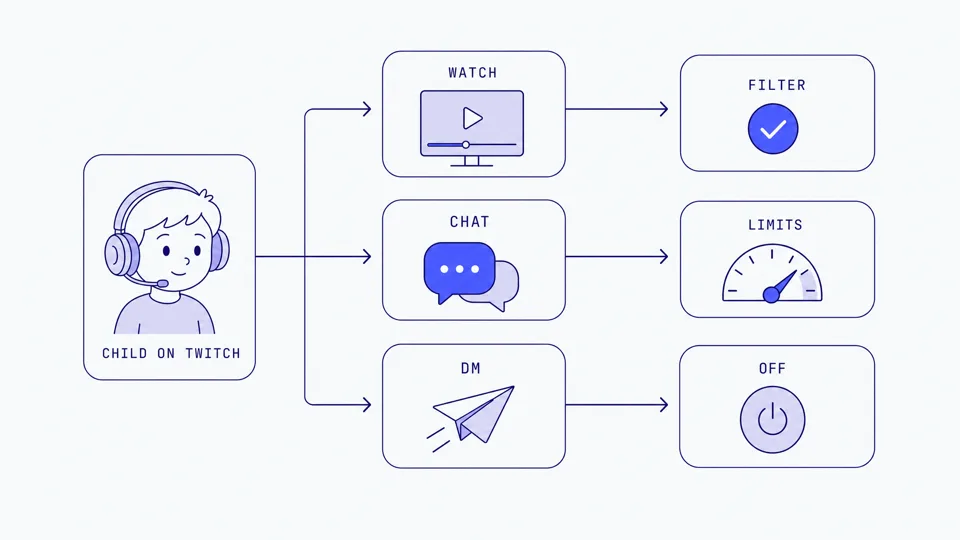
Watching: Your child follows streamers, watches live, and can type in the public chat. Anyone in that chat can talk back. They can also receive private messages called Whispers.
Streaming: Your child goes live themselves, often with a webcam and microphone, and strangers watch and comment in real time. This is where the most serious harms have been documented.
The age rules in 2026
Twitch's Terms of Service require users to be at least 13 years old. Users who are 13 or older but under the age of majority where they live (18 in most US states) are only permitted to use Twitch under the supervision of a parent or guardian. Children under 13 are not allowed on Twitch at all.
If you are in Australia, the floor is higher. Under Australia's social media minimum age law, which took effect on 10 December 2025, the minimum age for Twitch is 16. Twitch stopped new under-16 sign-ups from that date and began deactivating existing under-16 accounts from 9 January 2026. Parents cannot consent around this rule, so for Australian families a child under 16 should not be on Twitch, full stop.
The wider catch is enforcement. Creating an account only requires a birthdate and an email, so a self-declared age gate is easy to bypass by typing a fake year. As of 2026, Twitch has rolled out age assurance tools in some regions to meet local online safety laws, including facial age estimation or parental vouching for some younger users. Coverage is uneven and can be routed around, so you should not treat the age gate as a real barrier on its own.
What Twitch filters by default
Streamers are required to apply Content Classification Labels to flag streams with mature-rated games, sexual themes, drugs or intoxication, violent and graphic content, or gambling. For accounts registered as under 18, content labeled with Sexual Themes, Drugs, Violence, and Gambling is filtered out by default, and thumbnails for sexual content are blurred for everyone.
That default filtering is genuinely useful, but it leans entirely on streamers labeling their own content honestly, and it only works if the account's age is set truthfully. A teen who registered with a fake adult birthday loses those protections automatically.
The real risks on Twitch
Twitch is not a children' platform that happens to have some rough edges. It is an adult-skewing live platform where children are a minority, which shapes every risk below.
Unmoderated live chat and whispers
Every stream has a public chat, and popular ones move too fast for anyone to moderate fully. Your child can read and be exposed to profanity, harassment, and adult conversation in real time. On top of that, Whispers let strangers send private messages directly to your child. Whispers are a common on-ramp for grooming because they move a conversation out of public view. Blocking whispers from strangers closes that door for anyone who is not already a friend, follower, or subscriber.
The parasocial pull and moving off-platform
Streamers build intense one-sided relationships with viewers. Children can feel like they genuinely know a streamer they watch for hours, which lowers their guard. That parasocial closeness is exactly what makes "add me on Discord" or "DM me on Instagram" so effective. Once a conversation leaves Twitch, there is no moderation at all, and this is a well-documented pattern in gaming grooming. Our guide to grooming warning signs in gaming covers the escalation pattern in detail, and because so much of it moves to chat apps, our Discord parental controls guide is worth reading alongside this one.
Mature streams
Even with default filtering on, children can encounter streams with heavy profanity, violent games, gambling content, and edgy adult humor. Filters catch labeled content, not everything, and a stream can turn mature mid-broadcast without a label ever being applied. This is not a settings problem you can fully solve; it is a reason to keep an eye on what your child watches.
Streaming: your child live on camera
This is the most serious risk, and the numbers are stark. A Bloomberg investigation documented predators systematically tracking children who stream on Twitch, using the platform's own discovery tools to find children going live. Bloomberg identified nearly 280,000 children who were followed by a network of accounts exhibiting predatory patterns on the platform between 2020 and 2022. A later 2024 Bloomberg analysis, done with the Canadian Centre for Child Protection, reviewed nearly 1,100 Twitch clips and found that about 7.5% (83 clips) featured sexualized content of children, including young children exposing themselves on camera, often after being encouraged by viewers during a live stream.
The American Academy of Pediatrics has warned that minors on live streaming platforms are at risk of being manipulated and groomed by predators, and Twitch itself reports child exploitation to the National Center for Missing and Exploited Children (NCMEC). The lesson for parents is simple: a child streaming live, with a face-cam on, is uniquely exposed. Predators can watch, prompt them in real time, and clip whatever happens.
Watching vs streaming: where Twitch fits and where it doesn't
Here is an honest read on the safety options, and their limits.
Layer | What it does | Where it falls short |
|---|---|---|
Block Whispers from Strangers | Stops private messages from non-friends | Public chat is still open; a "friend" your child just met is not blocked |
Mature content filter (under-18 default) | Hides labeled sexual, drug, violent, gambling streams | Relies on honest labels and honest account age; misses unlabeled content |
Screen time / device limits | Caps how long they are on Twitch | Does nothing about who talks to them or what a stream shows |
No streaming rule (parent-set) | Removes the on-camera exposure risk entirely | Requires trust and follow-through; children can stream on a second account |
Gaming safety (e.g. Halo) | Sends you an alert when it detects grooming, bullying, or threats in the game chat where conversations often move | Not Twitch itself, and not DMs; on iPhone and iPad it covers the game on screen. Their voice never leaves their device; only the words are analysed, then discarded, never stored |
No single row is a full answer. Twitch has no true parent dashboard, so safety here is a stack: honest account age, whispers blocked, mature filter on, a firm streaming rule, and conversations that make your child comfortable telling you when something feels off. For the bigger picture across every game and app, start with our voice chat safety guide.
Age-specific guidance
Under 13 (under 16 in Australia)
Twitch is not permitted for this age. No account. In Australia, that floor is 16, not 13.
If they want to watch a specific streamer, watch together, and consider curated child platforms instead.
Key risk: a child creating a secret account with a fake birthday to get around the rule.
Ages 13 to 15 (16 and up in Australia)
Where they are old enough to have an account, use it only with supervision, as Twitch's own terms require.
Watching only. No streaming, and definitely no webcam.
Block whispers from strangers, keep mature content filtered, and check who they follow.
Key risk: whispers and the pull to move a chat to Discord or Snapchat.
Ages 16 to 17
More independence, but the streaming rule still matters.
If they stream, insist on no face-cam, a screen name that is not their real name, and no personal info (school, town, schedule) on screen or in chat.
Talk openly about parasocial dynamics and how "friendly" strangers operate.
Key risk: oversharing on stream and being tracked across sessions.
What to say to your child about Twitch
Ages 13 to 15
"If anyone sends you a private message on Twitch, especially asking you to chat somewhere else, tell me. That is the number one thing I care about."
"You won't be in trouble for showing me a message. I just want to help you handle it."
"We're not doing streaming with the camera on yet. Watching is fine, being on camera for strangers is not."
Ages 16 to 17
"It's easy to feel like you know a streamer you watch a lot. That closeness is exactly what someone with bad intentions counts on."
"If you ever stream, no real name, no face-cam, and nothing on screen that says where you are or what school you go to."
"If a conversation moves off Twitch and starts feeling off, that feeling is information. Trust it, and loop me in."
Frequently asked questions
Is Twitch safe for kids?
Twitch is rated 13+ (16+ in Australia) and is designed for a broadly adult audience, so it is not built for young children. For teens who are old enough, it can be made safer by keeping mature content filtered, blocking whispers from strangers, and not streaming with a camera on. The biggest risks are unmoderated live chat, private whispers, and predators who track children who go live.
What age do you have to be to use Twitch?
You must be at least 13 to use or stream on Twitch. In Australia, the minimum age is 16 under the country's social media age law, and under-16 accounts have been deactivated. Users between the minimum age and the age of majority (18 in most US states) are only permitted to use Twitch under a parent or guardian's supervision. Children under the minimum age are not allowed on the platform under Twitch's Terms of Service.
Can my kid get private messages from strangers on Twitch?
Yes, through a feature called Whispers, unless you block it. Go to Settings, then Privacy and Security, and turn on Block Whispers from Strangers. This stops anyone who is not a friend, follower, subscriber, or moderator from starting a private message. Grooming often moves into whispers or off Twitch entirely, so this setting matters.
Should my child stream on Twitch?
For younger children, no. Streaming puts a child live on camera in front of strangers who can prompt them in real time, and predators have been documented tracking and grooming child streamers at scale. If an older teen streams, keep the webcam off, use a screen name (not their real name), and stay in the room during broadcasts.
Does Twitch have parental controls?
Twitch has limited built-in controls and no true parent dashboard. You can filter mature content, block whispers from strangers, and rely on default content filtering for under-18 accounts. Because Twitch is live and cannot be pre-screened, device-level screen time tools and honest conversations do more of the heavy lifting than in-app settings.
Where do I change Twitch safety settings?
On the web or the mobile app, go to Settings, then Privacy and Security to block whispers from strangers, and Content Display Preferences (or Profile settings) to control mature content. There is no single "child mode." Combine these in-app toggles with device-level screen time limits, since Twitch offers no parent dashboard to manage a child's account remotely.
Sources
[Twitch Legal] "Terms of Service." legal.twitch.com
[Twitch Safety] "Guide for Parents and Educators" and "Age Assurance on Twitch." safety.twitch.tv
[Twitch Help] "How to Use Whispers." help.twitch.tv
[Twitch Safety] "Content Classification Labels." safety.twitch.tv
[Bloomberg] "Child Predators Use Amazon's Twitch to Systematically Track Kids Who Stream." 2022. bloomberg.com
[Bloomberg] "Twitch 'Clips' Feature Is Used by Predators to Record and Share Child Abuse." 2024. Analysis with the Canadian Centre for Child Protection finding ~7.5% of reviewed clips featured sexualized content of children. bloomberg.com
[eSafety Commissioner] "Social media age restrictions," Australia's under-16 minimum age law (effective 10 December 2025). esafety.gov.au
[American Academy of Pediatrics] Guidance on grooming risks to minors on live streaming platforms. aap.org
[NCMEC] Twitch reporting of child exploitation content. missingkids.org
[Internet Matters] "What is Twitch? A parent's guide." internetmatters.org
This guide is updated as Twitch changes its safety features. Last reviewed July 2026.