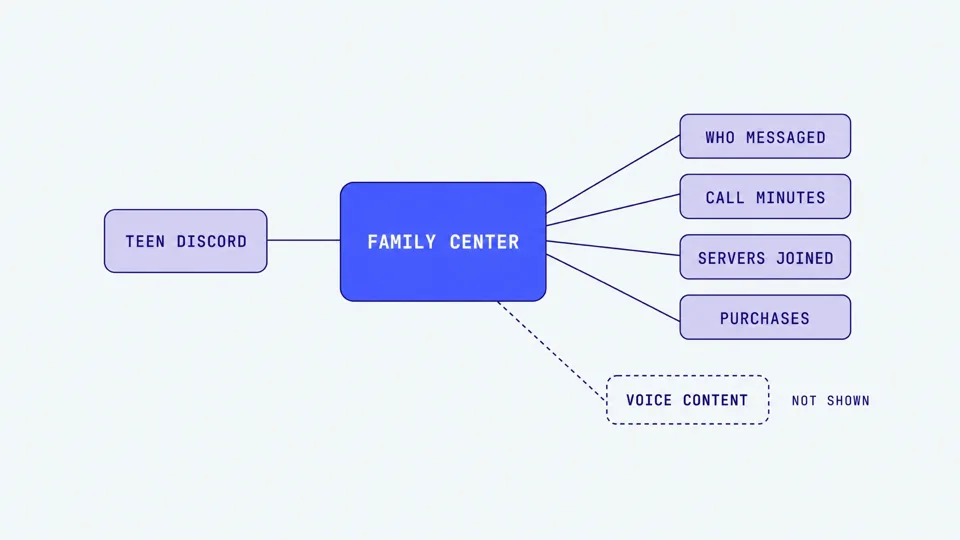
Quick answer: Discord Family Center links a parent account to a teen's account and shows the last 7 days of activity: who they messaged and called, servers they joined, call minutes, and purchases. It never shows message content and does not cover voice chat content. It is activity visibility, not monitoring.
If you set up Discord Family Center expecting to read your teen's chats or hear who they talk to on calls, you will be disappointed, and that is by design. Discord built Family Center to give you a window into patterns, not transcripts. Understanding exactly where that window ends is the whole point of this guide.
Below is what Family Center shows, how to turn it on in about five minutes, what it is genuinely good for, and the one gap that matters most for younger teens: voice. If you have already read our full Discord parental controls guide or our guide to grooming warning signs in gaming, this is the focused explainer on the Family Center feature itself.
Key takeaways
Family Center is activity visibility, not content monitoring. You see who and where, never what.
It shows the last 7 days only, and only from the moment you connect. Nothing before that appears.
Discord has a stated red line: it will not show teen message content to parents.
Voice appears only as a call-minute count. What is said on a call is never recorded, shown, or transcribed.
A November 2025 update added purchase visibility and guardian-locked DM controls, so Family Center is more useful than it was, but the voice gap remains.
How to set up Discord Family Center
Discord also rolled out age verification in 2026, which treats every unverified account as a teen by default and gates adult content behind a face scan or ID check. Family Center is the visibility layer that sits alongside those structural protections.
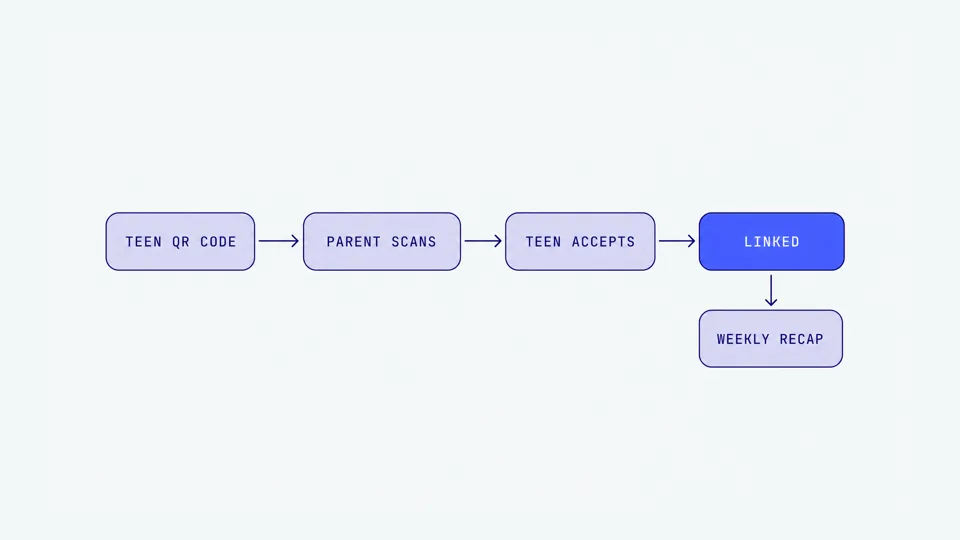
Family Center links a parent to a teen aged 13 to 17, which is also Discord's minimum age — under-13s should not be on Discord at all. You need the Discord mobile app on both your phone and your teen's phone to create the link. Once connected, you can view everything on desktop or browser too. The whole process takes a few minutes and requires your teen's cooperation, since they hold the QR code.
Enable Family Center on your account. Open User Settings, tap Family Center, and toggle on the Family Center tab.
Have your teen generate their code. On their device, they go to User Settings, tap Family Center, then Connect with Guardian to produce a QR code.
Scan the code. In your Family Center, tap My Family, then scan your teen's QR code with your Discord app.
Your teen accepts. They confirm the connection. Until they accept, nothing is linked.
Check the Activity tab. Go to User Settings, then Family Center, then the Activity tab to see the last 7 days. You will also get a weekly email recap at the address on your account.
One thing worth flagging to your teen up front: this is a two-way, consenting connection, not a covert install. They will know it is on, and Discord designed it that way. That transparency is a feature for trust, and a limitation if you were hoping for something quieter.
What Family Center actually shows
Once connected, the Activity tab and weekly email give you a summary of the last seven days. Discord is specific about the fields, so here is the full list of what a parent can see.
New friends: people your teen recently added, with display names and avatars.
Users messaged and called: the accounts your teen exchanged direct or group messages or calls with. You see the names, not the messages.
Total call minutes: how much time your teen spent in voice and video calls across DMs, groups, and servers.
Top users and servers: the top five people and servers your teen interacted with most, ranked by message and call frequency.
New servers: servers your teen joined or created, with names, icons, and member counts.
Active servers: servers where your teen joined a voice channel or sent a message.
Total purchases: Shop purchases and Nitro subscriptions from the past week, added in the November 2025 update.
Read those fields again and notice the pattern. Every single one is a who, a where, a how long, or a how much. None of them is a what. That is the shape of the whole product.
What Family Center deliberately does not show
Discord has been unusually direct about the boundary. "We have a red line: we're not going to be showing message content from teens to their parents," said Savannah Badalich, Discord's Global Head of Product Policy, when the November 2025 update launched (TechCrunch, 2025). Family Center is metadata, not chat logs.
Concretely, you will never see through Family Center:
The text of any message. Not DMs, not group chats, not server posts.
Anything said on a voice or video call. Calls are never recorded or transcribed. You only get the minute count.
Content of reported material. When a teen reports something and chooses to notify a guardian, Discord tells you a report happened, not what was in it.
Any history before you connected. Family Center only starts logging activity from the moment the link is accepted.
What Family Center is genuinely good for
None of this makes Family Center useless. Used the right way, it is a strong first layer, because a lot of risk shows up as a change in pattern long before you would ever need a transcript. You are watching for anomalies, not reading a diary.
Here is where it earns its place:
A new adult who suddenly dominates the list. If a stranger you have never heard of jumps to your teen's top-five most-messaged or most-called, that is a conversation worth having.
A big spike in call minutes. Grooming often moves quickly from casual to intense contact. A sudden jump in one-on-one call time is a visible signal even though the content is not.
Unexpected new servers. Servers with adult-heavy member counts or names that do not match your teen's interests are worth a gentle ask.
Purchase surprises. Nitro gifts and Shop spending can be a sign of manipulation, since gifts build a sense of obligation and secrecy.
A prompt for conversation. The weekly recap gives you a natural, low-drama reason to check in without hovering.
Think of Family Center as a smoke detector. It tells you something might be worth looking at. It does not tell you what is burning, and it cannot see into every room.
For a verdict on whether Discord is safe at each age from 10 to 16, including what Family Center can and cannot show you at each stage, see our Discord safety guide by age.
The voice gap Family Center leaves
Here is the room it cannot see into. Family Center reports how many minutes your teen spent on voice and video, and it can tell you they talked to a particular person a lot. It cannot tell you what was said, because Discord does not record or transcribe calls, and by policy it will not show that content to parents even if it could.
That matters because voice is where a disproportionate amount of grooming risk lives. Text leaves evidence, so predators increasingly push children toward voice, where nothing is written down. Voice also builds trust and familiarity far faster than text, which is why text monitoring misses so much voice grooming. A call-minute count is a useful flag, but it is silent on the actual conversation. For more on where Discord's voice layer leaves children exposed, see our guide to on-device versus cloud voice monitoring.
Discord reports child-safety incidents to the National Center for Missing and Exploited Children (NCMEC). In its 2024 Senate testimony, Discord said it delivered 317 high-harm grooming or endangerment reports to NCMEC and disabled 116,219 accounts and removed 29,128 servers for child safety in that period (U.S. Senate Judiciary Committee, 2024). Separately, financial sextortion reports have risen sharply in recent years — NCMEC received 26,718 reports of financial sextortion in 2023 — with messaging and gaming platforms named among the vectors (NCMEC, 2024). Family Center's visibility is a real step, but it sits above the layer where those harms actually happen.
Where a gaming safety net fits
Family Center answers "who and where." It does not answer "what is being said on the call." That second question is exactly the gap a gaming safety tool like Halo is built to fill, and it is a separate tool from Discord's own controls.
Halo is a gaming safety app for iPhone, iPad, Mac and Windows. It sends you an alert when it detects grooming, bullying, or threats in your child's game, including a stranger pushing them to move the conversation to another app. It monitors the voice chat and the text chat. It does not react to ordinary chat or swearing. On Mac and Windows, Halo monitors Discord on that computer. On iOS it does not cover the Discord app's voice at all; it only covers in-game voice for a title like Roblox through a manual session. Their voice never leaves their device. Only the words are analysed, then discarded. Never stored. You get a summary, not a recording. It does not read text and it does not tap console voice, so it is honestly one complementary layer alongside Family Center, not a guarantee or a replacement. Pricing is about about US$8 a month billed annually (US$99.99 a year, AU$149.99), or US$12.99 month-to-month (AU$19.99), with a 7-day free trial.
Layer | What it does | What it cannot do |
|---|---|---|
Discord Family Center | Shows who your teen messaged and called, servers, call minutes, purchases (last 7 days) | No message content, no voice content, nothing before you connected |
Discord DM and content controls | Guardian-locked settings for who can DM your teen and sensitive-content filtering | Blocking and filtering only, no visibility into what is said |
Halo (gaming safety net) | Sends you an alert when it detects grooming, bullying, or threats, including a stranger pushing to move apps (Discord and other voice apps on Mac and PC; the game on screen on iPhone and iPad) | No Android yet, no Discord DMs, no console voice, iOS needs a manual session start (not the Discord app) |
Used together, these three cover more than any one alone: Family Center for the pattern, DM controls to lock down who can reach your teen, and a voice net for the calls Family Center can only count. For the bigger picture across every platform your child plays on, our voice chat safety guide pulls it all together.
What to say to your teen
Family Center works far better as a shared agreement than a surprise. A few lines that keep it honest:
"I turned on Family Center. I can see who you talk to and which servers you join, but I can't read your messages or hear your calls. That's the deal, and it stays that way."
"If a name I don't recognize starts showing up a lot, I'm going to ask about it. Not to snoop, just to check you're good."
"If anyone ever asks you to move a chat off Discord, or to hop on a private call, that's the exact thing I want you to tell me about. You won't be in trouble."
"Gifts and Nitro from people you don't know in real life are a red flag, even when they feel nice. Loop me in."
Frequently asked questions
What does Discord Family Center actually show parents?
For the last 7 days it shows new friends your teen added, the users they messaged or called, total call minutes, their top five users and servers, new servers joined or created, active servers, and total purchases. It shows who and where, not what. Parents cannot read message content or listen to any calls.
Can I read my teen's Discord messages with Family Center?
No. Discord has stated a firm policy that it will not show message content from teens to parents. Family Center shows metadata only, meaning names, servers, call minutes, and purchases. If you need to see what was actually said, Family Center cannot do that, and neither can Discord's own tools.
Does Discord Family Center cover voice chat?
Only the number of minutes spent in voice and video calls. It does not show who your teen talked to by voice content, and it never records or transcribes calls. Voice is where a lot of grooming risk lives, so Family Center's call-minute count is a signal, not a safety net for what is being said.
How do I set up Discord Family Center?
Both accounts need the Discord mobile app. The teen opens User Settings, taps Family Center, then Connect with Guardian to generate a QR code. The parent opens Family Center, taps My Family, then scans that QR code. Once the teen accepts, you both get access, plus a weekly email recap.
Does Family Center work if my teen uses Discord on a PC?
You set up the connection using the mobile app on both sides, but once linked you can view the Activity tab on desktop or browser too. The data covers your teen's Discord activity across their devices, not just mobile. It only starts recording activity from the moment you connect, so nothing before that appears.
Is Family Center enough to keep my teen safe on Discord?
It is a good first layer for visibility, but it is not monitoring. It shows patterns, like a new server or a stranger they suddenly call often, without showing what is said in text or voice. Pair it with locked DM controls, honest conversations, and a voice safety net for the calls Family Center cannot see into.
Sources
[Discord Support] "What is Family Center?" support.discord.com
[Discord Support] "Family Center for Parents and Guardians." support.discord.com
[Discord Support] "Family Center for Teens." support.discord.com
[Discord] "Family Center is Getting an Update." discord.com/safety
[TechCrunch] "Discord's Family Center update now lets parents monitor weekly purchases." November 2025. techcrunch.com/2025/11/05/discords-family-center-update-now-lets-parents-monitor-weekly-purchases/
[EdTech Innovation Hub] "Discord expands Family Center with new visibility tools." November 2025. edtechinnovationhub.com
[U.S. Senate Judiciary Committee] "Testimony of Jason Citron, Discord." January 2024. judiciary.senate.gov
[NCMEC] "CyberTipline 2023 Report." 2024. missingkids.org
[Discord Safety] "Teen and Child Safety Policy Explainer." discord.com/safety
This guide is updated as Discord changes Family Center. Last reviewed July 2026.