Quick answer: Screen Time and Family Link limit hours but can't hear what's said in voice chat. The most effective immediate step is locking voice chat to "Friends only" on every game your child plays (Roblox, Fortnite, Discord, consoles), setting a parental PIN, and having a direct conversation about what to do if something feels wrong.
If your child plays Roblox, Fortnite, Minecraft, or uses Discord, you go blind the moment the headset goes on. Screen Time controls how long they play. It doesn't control who talks to them or what gets said.
This guide covers what to change tonight on each platform, the warning signs worth paying attention to, and how to stay aware of voice chat without becoming the parent who bans everything.
Start here: the 10-minute voice chat safety checklist
Do these tonight. Most important first.
Set voice chat to "Friends only" or "Off" on every game your child plays: Roblox, Fortnite, console.
Lock the settings with a PIN so they can't change them back.
If they use Discord: turn on Family Center. It lets you see activity without reading messages.
Have a short conversation: "If anyone asks you to move to a different app, keep something secret, or share personal info. Tell me. You won't be in trouble."
If you can't fully turn off voice chat (or they push back), use a tool that sends you an alert when it detects grooming, bullying, or threats, instead of listening in.
For ages 9-12: voice chat with strangers = no. Voice chat with real-life friends only = maybe, with the settings above locked in.
Why voice chat is different from text
Text messages leave a trail. You can screenshot them. You can scroll back. Apps like Bark can scan them for concerning content.
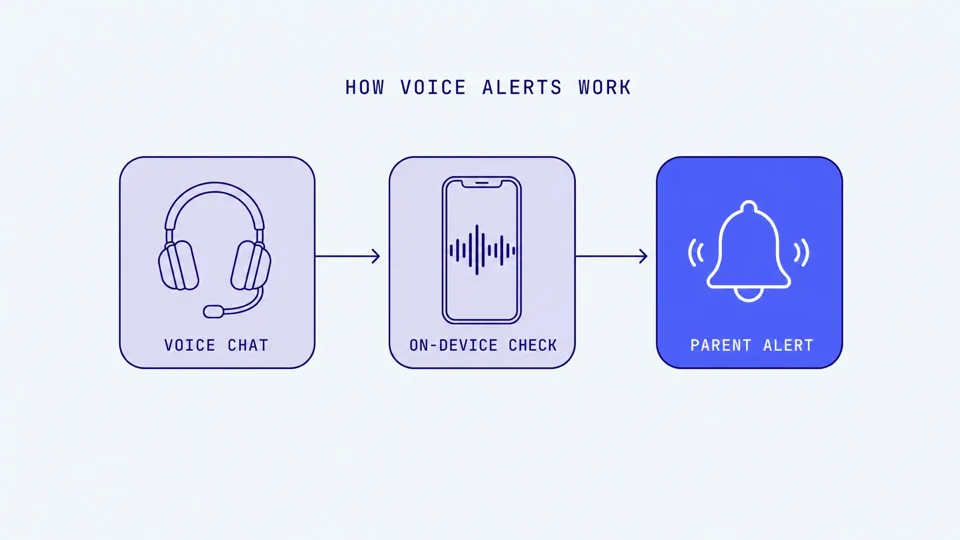
Voice chat disappears the second it's spoken.
If something inappropriate happens in a game lobby (sexual language, manipulation, threats), there's nothing to check afterwards. No log, no transcript, no evidence. That's the part most parents don't realize until something goes wrong.
Three in four young gamers aged 10 to 17 have experienced harassment in online multiplayer games, according to the Anti-Defamation League in 2023. That's not a worst-case scenario. It's the average experience.
Screen Time doesn't cover this
This trips up a lot of parents. Screen Time is good at limiting hours. But it has no way to control who talks to your child during those hours, or to flag what's being said. Voice chat safety and screen time limits are two different problems. You need tools for both.
Children say things out loud they'd never type
In a voice conversation, with the social pressure, the excitement of the game, the anonymity of a headset, children share information they'd never put in writing. Their real name. Their school. "My parents aren't home." Where they live, even roughly.
Voice builds trust and familiarity faster than text. A child can spend weeks talking to someone they believe is another child their age, not realizing they're speaking with an adult using voice-changing software. The Child Rescue Coalition has documented how voice communication creates a false sense of closeness that predators use to lower a child's guard.
Where children use voice chat
Voice chat shows up differently depending on the game and device. Here's what to check and change on each platform, split by age.
Roblox (voice chat is age-gated)
Since April 2026, Roblox uses three account types: Kids (5 to 8), Select (9 to 15), and 16+. Voice chat is available from age 9 after an age check, but it is off by default for children under 13 and limited to trusted connections until 13. Parents can enable or disable it through Parental Controls.
Check your child's account anyway. Account ages can be entered wrong, and children sometimes use an older sibling's verified account.
If your child is under 9 (Kids account):
Voice chat is not available at all.
The bigger risk at this age is text chat and friend requests. Someone saying "add me on Discord" or "let's talk somewhere private."
If your child is 9 to 12 (Select account):
Voice chat is off by default. If you enable it, it is limited to trusted connections.
Settings → Parental Controls → set a PIN
Communication → Voice Chat → Trusted only (or No one)
If your child is 13+:
Settings → Parental Controls → set a PIN
Communication → Voice Chat → Trusted only (or No one)
Review who can send friend requests
Watch for: Requests to move off Roblox (to Discord or Snapchat). Secrecy. Gifts from strangers (Robux).
Roblox has around 132 million daily active users (Q1 2026) and filed 65,381 reports of suspected child exploitation to NCMEC in 2025, up from 13,316 in 2023.
Discord (where conversations migrate)
Discord is the platform parents should pay the most attention to. Predators commonly meet children inside a game, build rapport, then say "add me on Discord." Once the conversation moves off the game platform, there's less moderation and more privacy.
Discord's message filtering for minors doesn't screen messages from "friends," and predators make themselves friends first.
Ages 9-12: Best option is don't use Discord. It's not designed for this age group.
Ages 13+:
Turn on Family Center (Settings → Family Center)
Restrict friend requests and DMs from strangers
Be cautious about public servers
Watch for: "Let's talk privately." Emotional dependency language ("you're the only one who gets me"). Rapid escalation and secrecy.
Discord launched teen-appropriate defaults globally in March 2026, including age inference models and restricted age-gated content.
Fortnite (voice is on by default)
Fortnite voice chat is live out of the box. No age verification required for voice. When your child joins a squad, they can talk to whoever else is in that lobby.
Ages 9-12:
Voice chat → Friends only (or Off)
No open squad chat with strangers
Ages 13+:
Party chat → Friends only
Game chat → Off unless you're comfortable
Do this: Epic parental controls → Voice Chat → Friends only → lock with a PIN.
Watch for: Older-sounding voices in a party. Messages after a match ("you're good, add me").
Minecraft (voice usually happens outside the game)
Minecraft often doesn't have built-in voice chat. But children use Discord or console party chat alongside it. Treat Minecraft as "Minecraft + Discord," not just Minecraft.
Java Edition: No built-in parental controls. Use Microsoft Family Safety.
Bedrock Edition: family.microsoft.com → disable multiplayer, chat, or friend requests.
Set in-game chat to "Commands Only" or "Hidden."
Realms (invite-only servers) are safer than public ones, but know who's invited.
For a full breakdown see our Minecraft voice chat safety guide.
Xbox and PlayStation (the one parents miss)
Console party chat keeps running even after the game ends. Your child can finish playing but keep talking to whoever was in the party. Most parents don't realize this.
Ages 9-12:
Voice → Friends only
Block messages and invites from non-friends
Ages 13+: Friends only + review privacy settings every few months.
Do this: Console Settings → Privacy → Communications → Friends only.
The simple rule
Under 12: Voice chat with strangers = no. With real-life friends = maybe, with settings locked.
Teens: Voice chat can be fine, but only with settings, a conversation about boundaries, and a safety net.
For the open-lobby voice risk in practice, our GTA Online voice chat safety guide covers what parents face in one of the biggest unmoderated lobbies.
What can happen in voice chat
Understanding the actual risks helps you talk to your child honestly, without overdoing the fear or downplaying real dangers.
Grooming
Online grooming in gaming follows a pattern that child safety researchers have documented:
Contact: The adult joins a child-friendly game and starts casual conversation.
Trust: They help with quests, send in-game gifts (Robux, V-Bucks), or offer emotional support.
Testing: Small boundary pushes. "Keep this between us." "Let's chat somewhere private."
Escalation: Requests for personal information, photos, or moving to a private platform.
Exploitation: Sexual solicitation, sextortion, or attempts to meet in person.
Voice chat can speed this up. The WeProtect Global Alliance's 2023 Global Threat Assessment found conversations with children on gaming platforms can escalate into high-risk grooming in as little as 19 seconds, with an average of about 45 minutes.
Thorn's 2024 Youth Perspectives study found that one in three boys aged 9-12 have experienced an online sexual interaction. The NSPCC reported that online grooming crimes in the UK reached record levels in 2023/24, with 7,062 offences recorded, up 89% in six years. The youngest victim was five years old.
Bullying and toxic behavior
Not every risk comes from adults. Peer-to-peer toxicity in gaming voice chat is constant:
Slurs, name-calling, personal attacks during gameplay
Social manipulation ("if you don't do X, we'll kick you")
Doxxing threats ("I'll find where you live")
Group targeting: multiple players going after one child
59% of female gamers hide their gender to avoid harassment (Reach3 Insights, 2021). When a girl speaks in voice chat, she's often targeted immediately.
The difference between voice and text bullying: there's no evidence afterward. Your child might not be able to explain, or prove, what happened.
Information children give away without realizing
In the middle of an excited voice conversation, children share things they'd never type out:
Real name and age
School name
Neighborhood or address (even loosely)
"My parents aren't home right now"
Social media handles (Discord, Snapchat usernames)
A patient adult can piece this together across multiple conversations without ever asking a suspicious question.
Warning signs your child may be at risk
No single sign means something is wrong. Teenagers are naturally private. But clusters of these, especially secrecy combined with emotional changes and unexplained gifts, should lead to a conversation.
Behavior changes
Becoming secretive about what they do online
Switching screens or closing apps when you walk past
Emotional after gaming sessions: quiet, angry, or upset
Mentioning an online "friend" who seems unusually interested in them
Using sexual language that doesn't match their age
Pulling away from family or offline friends
Device red flags
New apps you didn't install (especially messaging apps)
Hidden or secondary accounts on gaming platforms
Playing at unusual hours (late night, early morning)
Getting protective about their phone or headset
New Discord servers with unfamiliar names
Receiving in-game gifts or currency from people they don't know
What to do
Don't panic. Don't interrogate. Start a conversation. The goal is to keep communication open so your child comes to you when something feels off.
Your options for monitoring voice chat
There's no single perfect answer. Each approach has trade-offs, and the right choice depends on your child's age, the devices they use, and how much visibility you need.
Option 1: Platform controls (free)
Turn off or restrict voice chat directly in each game or console.
Good for: Younger children where "off" is the right answer. Limitation: All-or-nothing. You can block voice or allow it, but you get no visibility into what's being said.
Platform | Where to find it | Settings |
|---|---|---|
Roblox | Settings → Parental Controls → Communication | Trusted only / No one |
Discord | User Settings → Privacy & Safety | DM controls, content filter, Family Center |
Fortnite | epicgames.com/fortnite/parental-controls | Off / Friends / Party / Everyone |
Xbox | Settings → Account → Privacy & Online Safety | Per-game and console-wide |
PlayStation | Settings → Family Management → Parental Controls | Voice chat restrictions |
Option 2: Text monitoring apps (Bark, Qustodio, Net Nanny)
Apps like Bark ($14/month) and Qustodio ($5-10/month) monitor text messages, social media, web activity, and screen time. They do this well.
Bark cannot monitor voice chat on any platform. Qustodio launched gaming voice alerts in March 2026 on Windows only, covering Roblox, Fortnite, Valorant, and Steam, with Discord added in September 2026.
Bark recently added Roblox text chat monitoring on Android, but it only captures your child's side of the conversation (not what the other person said) and parents report it's inconsistent. Voice conversations are not monitored on any platform.
Good for: Covering text, web, and app activity. Limitation: Voice chat has been the blind spot, and predators know this. They migrate conversations to voice on purpose.
Option 3: PC voice monitoring (Aura + Kidas)
Aura's "Safe Gaming" feature monitors voice and text in PC games, powered by Kidas.
Good for: Families where children game mainly on a Windows PC. Limitations: Windows only. Cloud-based (audio is processed on external servers). Part of a $32/month Aura bundle.
Option 4: Mobile + PC + Mac danger alerts (Halo)
Halo sends you an alert when it detects grooming, bullying, or threats in your child's game. It monitors the voice chat and the text chat. Not general chat or swearing. Their voice never leaves their device. Only the words are analysed, then discarded. Never stored. You get a summary, not a recording. Text chat is handled the same way.
What it covers:
iOS: In-game voice and on-screen text chat, any game
Mac & Windows: Voice and text chat in every game, plus Discord (runs automatically)
What it doesn't cover yet:
Android (in the works)
iOS can't capture Discord or VoIP audio (this is an Apple platform limitation)
On iOS, your child starts each session manually. On Mac/PC, it runs in the background.
Price: 7-day free trial, then US$99.99/yr (about US$8/mo billed annually) or US$12.99/mo.
Comparison
Feature | Platform controls | Bark / Qustodio | Aura (Kidas) | Halo |
|---|---|---|---|---|
In-game danger alerts | ❌ | Qustodio: ✅ Windows | ✅ Windows only | ✅ iOS + PC + Mac |
Text monitoring | ❌ | ✅ | ✅ | ✅ in-game text chat |
Mobile | ✅ | ✅ | ❌ | ✅ (iOS) |
Audio stays on the device | N/A | ❌ | ❌ | ✅ |
Price | Free | $5-14/mo | $32/mo (bundle) | US$99.99/yr or US$12.99/mo (7-day free trial) |
One way to think about it: text monitoring apps cover the paper trail. Voice monitoring covers the conversations that don't leave one. If your child games on a phone or tablet, only Halo covers voice and in-game text chat on mobile right now.
If you use Bark and want to know exactly what it covers in games, our breakdown of whether Bark monitors game voice chat has the honest answer.
For a detailed walkthrough of Fortnite's party and lobby voice settings, see our Fortnite voice chat safety guide.
Setting up voice chat parental controls
The diagram above skips Nintendo: Switch 2 GameChat and the Switch 1 phone app each need their own setup, covered in our Nintendo Switch parental controls guide.
Discord voice channels carry their own set of risks; our Discord voice chat safety guide covers what parents should know.
Talking to your child about voice chat
Settings are the floor. Conversation is the ceiling. The most effective protection is a child who feels comfortable coming to you when something is off.
Ages 8-10
"Some people online pretend to be children when they're actually adults. If anyone asks you personal questions or makes you feel weird, tell me straight away."
"I'm not trying to get you in trouble. I just want to help you stay safe."
"Let's decide together which games you play and who you can talk to."
Ages 11-13
"If someone you met in a game asks you to chat somewhere else, like Discord or Snapchat, that's a warning sign. Why would they want to leave the game?"
"Has anyone ever said anything to you online that made you uncomfortable?"
"I know you can handle a lot. But some people online are really good at tricking even smart children."
Ages 14-17
"I respect your privacy. I also care about your safety. Let's talk about what makes sense."
"Predators target teens too, often by pretending to be a couple of years older. Have you run into anything like that?"
"If something happens that you're embarrassed about, I'd rather help you deal with it than have you face it alone."
If something has already happened
If you discover something concerning: "I noticed [specific thing]. I'm not angry. I'm worried about your safety. Can you help me understand what happened?"
If your child tells you: "Thank you for telling me. That took courage. This is not your fault. Let's work out what to do."
If they resist monitoring: "Here's the deal: this means I can stop wondering without reading your messages. When you're [age], we'll revisit. Fair?"
Frequently asked questions
Can parents monitor Roblox voice chat?
Roblox parental controls let you disable voice chat, but they don't monitor what's said. For actual voice analysis, you need a third-party app. Aura's Safe Gaming works on Windows. Halo monitors voice and text chat in every game on iPhone, iPad, Mac, and Windows. Qustodio launched gaming voice alerts in March 2026 on Windows, covering Roblox, Fortnite, Valorant, Steam, and Discord.
Does Bark monitor voice chat?
No. Bark monitors text messages, emails, and 30+ platforms for concerning text and image content. It recently added Roblox text chat monitoring on Android. Voice conversations are not monitored on any platform.
Is Discord voice chat safe for kids?
Discord voice chat carries real risks for unsupervised children. It's the most common platform where gaming conversations migrate to. Predators meet children in games and then push for Discord where there's less moderation. Discord's March 2026 update added teen defaults and Family Center tools, but multiple state attorneys general have flagged it as a common grooming vector.
What age is voice chat appropriate?
Most platforms gate voice chat at 13+. Roblox allows voice chat from age 9 with trusted connections, opening it wider at 13. Children under 12 should avoid voice chat with strangers entirely. For teens, voice chat is manageable with settings locked to Friends only, a conversation about what to watch for, and monitoring in place.
How do I know if my child is being groomed online?
Look for clusters of signs: secretive device behavior combined with emotional changes and unexplained gifts or new online relationships. Any one of these can be normal. Multiple signs together, especially secrecy plus a new older friend who gives them things, should prompt a direct, calm conversation.
What should I do if I suspect grooming?
Don't tip off the predator or let your child warn them. Document everything: screenshots, usernames, dates, gifts. Report to CyberTipline.org (NCMEC) and local police. Get support: counseling for your child, because grooming causes psychological harm even without physical contact. Report to the platform too (Roblox, Discord, and Epic Games all have reporting tools).
Sources
[ADL / Newzoo] "Hate Is No Game: Hate and Harassment in Online Games 2023." adl.org
[Thorn] "2024 Youth Perspectives on Online Safety." thorn.org
[WeProtect Global Alliance] "Global Threat Assessment 2023." weprotect.org
[NSPCC] "Online grooming crimes against children increase by 89% in six years." 2024. nspcc.org.uk
[Reach3 Insights] "Women and Gaming Study." 2021.
[Games Industry] "Roblox reported over 13,000 incidents to NCMEC in 2023." July 2024.
[Tor Hoerman Law] "Child Predators on Roblox: Lawsuits Filed by Parents." 2026.
[CBS News] "Online predators use video games and AI to target kids." March 2026.
[Amherst Indy] "What Parental Control Apps Miss That Predators Exploit." March 2026.
[Discord] "Discord Launches Teen Default Experience Globally." March 2026.
[Roblox] "Age Checks Now Required to Chat." January 2026. about.roblox.com
[Child Rescue Coalition] "When Online Video Gaming Friendships Lead to Exploitation." childrescuecoalition.org
[Save the Children] "Two-thirds of children interact daily online with people they don't know." September 2024.
[Qustodio] "Gaming alerts: supporting kids in online play." March 2026. qustodio.com
This guide is updated regularly as gaming platforms change their safety features. Last reviewed September 2026.