Quick answer: Bark monitors the text your child sends in Roblox and Discord on Android and the Bark Phone, plus Roblox on Amazon Fire. It does not read messages other people send, it has no Roblox or Discord chat coverage on iPhone or iPad, and it does not cover voice chat on any device. Voice is the blind spot.
If you have Bark installed and assumed it covers what happens in your child's games, this is the article to read. Bark is a capable text-monitoring tool, and for what it does, it does it well. But "monitors Roblox" and "monitors Roblox voice chat" are two very different claims, and the gap between them is exactly where a lot of the real risk lives.
This is a device-by-device breakdown of what Bark catches and what it misses, taken from Bark's own support pages, with dates. Disclosure: we make Halo, which covers the voice gap this article describes. Its limits are listed as plainly as Bark's.
Key takeaways
Bark monitors text, not voice. It scans written messages and searches. It does not cover live voice chat in any game, on any device.
Roblox and Discord chat coverage is Android and Bark Phone only (Roblox also on Amazon Fire). Bark's own iOS page lists Roblox as "No coverage on iOS." On iPhone, iPad, and computers, Bark can block these apps but not read them.
It sees your child's side only. Bark scans sent chats and searches. What a stranger types to your child is not scanned unless it lands in a supported messaging app.
Consoles are off limits entirely. Bark Home can schedule and block on Xbox, PlayStation, and Switch. Nobody's tool reads console chat.
Layering works. A text tool on the phone plus a layer inside the game covers both the written and the spoken channel, though no setup catches everything.
Does Bark monitor Roblox?
Partially. On Android, Amazon Fire, and the Bark Phone, Bark scans the text your child sends in Roblox and their content searches. Nothing on iPhone or iPad, nothing in voice chat.
Bark's Roblox support article, updated June 2026, is specific: on Android, Fire, and the Bark Phone, Bark can "scan content searches and sent chats." That is the whole claim. Received messages are not scanned. Voice is not mentioned because Bark does not cover it.
On Android, Amazon Fire, and the Bark Phone
This is where Bark's Roblox coverage lives. Install Bark on the device, and it scans what your child types in Roblox chat and what they search for, then runs it through Bark's classifiers for bullying, sexual content, self-harm, drugs, and predatory language. When something trips a classifier, you get an alert with the flagged text.
The Bark Phone is an Android phone with Bark built in, so it gets the same Roblox coverage. Yes, your child can play Roblox on a Bark Phone, and yes, their sent chats are scanned there.
On iPhone and iPad
No coverage. Bark's own iOS page spells it out: Apple does not let outside apps access the data on your child's device, and Roblox is listed as "No coverage on iOS." The same applies to iPad, which Bark treats as iOS.
Bark's iOS workarounds do not close this gap. The Bark Sync charger scans texts, iMessages, photos, videos, voice memos, Notes, WhatsApp, and Kik when the device is plugged in. Roblox chat is not on that list. The Bark desktop app, connected by USB, covers similar ground. Neither reads what happens inside Roblox.
If your child plays Roblox on an iPad, which is where most younger children play it, Bark is not watching that chat. Roblox's own settings are your main lever there. Our Roblox parental controls guide walks through them, and our Roblox safety guide by age gives a verdict for each age from 5 to 13.
On Xbox, PlayStation, and Switch
Nothing in the game. Bark Home is a router-level device that sets screen-time schedules for the console, blocks website categories, and alerts you if the console tries to visit a sexual-content site. It cannot read Roblox chat, party chat, or voice, because no third-party tool can reach inside a console. Console chat is controlled by the console's own privacy settings and nothing else. Our Xbox voice chat controls and Nintendo Switch controls guides cover what each platform lets you lock down.
Roblox voice chat
Not covered on any device. Roblox voice chat is available from age 9 after an age check, limited to trusted connections until 13, and it leaves no text for Bark to scan. If your child has voice on, Bark is not part of the picture for it. Our Roblox voice chat safety guide covers what voice changes and how to handle it.
Does Bark monitor Discord?
On Android and the Bark Phone, yes for text: DMs, group messages, and server channels. Nothing on iPhone, iPad, or computers, and nothing in voice channels.
Discord is where gaming conversations go when they leave the game, and it is the platform parents ask us about most. Bark's Discord coverage, from the same June 2026 support article, is text only: direct messages, group DMs, and messages in servers, on Android and the Bark Phone. On iOS and computers, Bark lists Discord as blocking only. You can stop your child opening it. You cannot read it.
Voice channels and voice calls are not covered anywhere. That matters more on Discord than on any other platform, because voice is how Discord is mostly used for gaming. A teen in a server voice channel with twenty people, or a private call with someone they met in a game, is outside Bark's reach on every device.
For the full picture of what any parent can see on Discord, read can parents see Discord messages. For the settings side, our Discord parental controls guide. For a verdict at each age from 10 to 16, our Discord safety guide by age.
What Bark catches vs misses, by platform
Here is the matrix. This is Bark on the devices families actually use, from Bark's own documentation as of September 2026.
Platform | Text chat | Voice chat | Notes |
|---|---|---|---|
Roblox | Yes on Android, Fire, and Bark Phone (sent chats and searches). No on iPhone, iPad, or computers. | No on any device | Received messages are not scanned. Bark lists Roblox as "No coverage on iOS." |
Discord | Yes on Android and Bark Phone (DMs, group DMs, servers). No on iOS or computers. | No on any device | Voice channels are where most live gaming talk happens. Bark covers none of it. |
Fortnite | No. Fortnite in-game chat is not on Bark's list of monitored apps. | No | Party voice is uncovered. Bark may catch related text only if it happens in a supported app like Discord on Android. |
Console (Xbox, PlayStation, Switch) | No | No | Bark Home does schedules and site blocking only. No third-party tool reads console chat. |
SMS, iMessage, email | Yes (strongest on Android; on iPhone via the Sync charger or desktop app) | N/A | This is Bark's home turf and where it is strongest. |
Read down the voice column. It is "no" every single time. Bark is not unusual here. Every text-based parental tool has the same voice column. Voice is a separate technical problem that text monitoring was never built to solve. Our companion piece on why Bark cannot cover voice chat goes deeper on the mechanics.
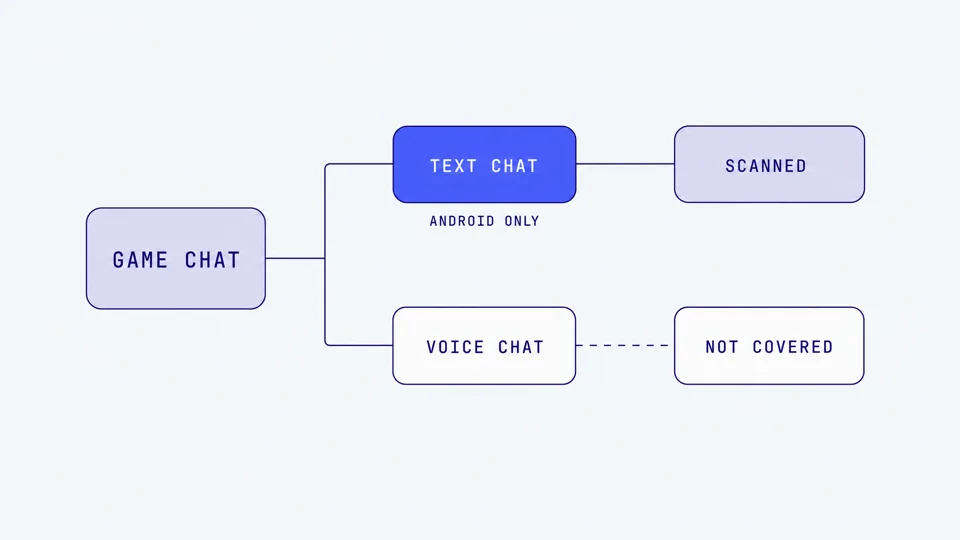
Half a conversation
One more nuance. Where Bark scans Roblox, it scans what your child sends. The other person's messages are not scanned unless they arrive in a supported messaging app on the same device. Grooming often works by getting the child to reveal things, so seeing only your child's side can hide the intent of the adult on the other end. It is coverage, but it is partial coverage.
Does Qustodio monitor Roblox?
Not the text. Qustodio can block Roblox and set time limits anywhere, and its gaming alerts flag concerning voice chat in Roblox, but only on Windows PCs.
Parents comparing tools usually land on Qustodio next, so here is the same treatment. Qustodio does not read Roblox text chat on any device. What it added in March 2026 is gaming alerts: on a Windows PC, it flags concerning voice conversation in Roblox, Steam, Fortnite, and Valorant, and Discord joined that list on 4 September 2026. Qustodio's help page says the feature is available for games played on Windows. It is not on Mac, iPhone, iPad, Android, or consoles.
Two things we could not verify from Qustodio's own pages: whether the alerts cover what the other person says as well as what your child says, and which plan tier includes it. If your child games on a Windows PC, Qustodio is now a real option for voice. If they game on an iPad, it is a blocking and time-limit tool, nothing more. Our Bark vs Gabb vs Qustodio comparison puts the three side by side, and Qustodio and voice chat covers its gaps in detail.
Can I see my child's Roblox chat history?
Not through Roblox's parental controls, and not through Bark on an iPhone or iPad.
Roblox gives parents real levers: who the child can chat with, a list of connections to review and block, screen-time and spending limits, content maturity settings, and a voice chat toggle that stays trusted-only through age 12 and can be switched off through 15. What it does not give you is a chat-history viewer. You cannot read your child's messages from the parent dashboard.
Logging into your child's account shows recent text chat, which is manual, partial, and easy for a child to clear. Voice chat is never stored, so there is nothing to read back. Bark adds visibility only on Android, Fire, and the Bark Phone, and only for what your child sent. Our guide to what parents can see in Roblox chat covers every option, tool by tool.
Why the voice gap matters more than it looks
It would be easy to shrug at the voice column and think text coverage is enough. The numbers say otherwise.
NCMEC's CyberTipline received 1.4 million reports of online enticement in 2025, up 158 percent from the year before, including more than 80,000 reports concerning sextortion (NCMEC, 2026). Part of that rise reflects a 2024 law requiring platforms to report enticement, so treat it as a count of reports rather than a count of children. Even so, the direction is not in doubt. One in three boys aged 9 to 12 have reported an online sexual interaction (Thorn, 2024). Predators build trust first, and voice builds trust faster than text because it feels personal and immediate. Our guide to the warning signs of grooming in online gaming breaks down what that build-up looks like.
There is also a speed problem. The WeProtect Global Alliance's 2023 Global Threat Assessment found conversations with children on gaming platforms can escalate into high-risk grooming in as little as 19 seconds, with an average of about 45 minutes. A tool that scans written messages after they are sent is structurally slower than a live voice conversation moving that fast, and if the conversation is spoken, there is no message to scan at all.
The tactic that ties it together is the platform hop. A stranger meets a child in a public Roblox game, then says "add me on Discord" or "hop in a call." Once the conversation is voice, it has left the reach of every text tool, Bark included. Our piece on how text monitoring misses voice grooming walks through this pattern. The short version: the moment a child puts on a headset, a text-only tool goes quiet.
Where Halo fits, and where it does not
This is the part where we describe what Halo does, and we are going to be as plain about its limits as we were about Bark's, because a tool that oversells itself is worse than useless in child safety.
Halo is built for the one place Bark is not: inside the game. Halo monitors the voice and text chat inside the game. When it detects grooming, bullying, or threats, it sends you an alert with a short summary, enough to talk to your child. An alert reads like this: "A stranger asked Liam for his address." Ordinary chat and swearing stay between your child and their friends.
Privacy, plainly: their voice never leaves their device. Only the words are analysed by Halo's secure service, then discarded, never stored. Prefer it fully on-device? One switch in the parent app.
Where Halo works and where it does not:
iPhone and iPad: voice and text chat in any game, using a session that you or your child starts. It is not always-on background detection. Someone has to start the session, which is a real limit worth knowing up front.
Mac and Windows: voice and text chat in the game, including Discord voice on the desktop, where a lot of PC gaming conversation lives.
No Android yet. If your child games on an Android phone, Halo is not an option today. This is the mirror image of Bark, which is strongest on Android.
Not Discord text or DMs, not phone texts, not consoles. Halo does not read Discord messages, and nobody's app reaches Xbox, PlayStation, or Switch chat.
Bark watches the phone. Halo is in the game. Keep what you've got, and add the layer for the game. Together they cover both the written and the spoken channel a stranger can use to reach a child, though no setup catches everything. Halo is free for 7 days. For the full picture of the voice side across every platform, the voice chat safety guide pulls it together.
What to do tonight, by setup
If your child games on an Android phone or tablet
Bark earns its keep here, and this is its strongest environment. Keep it for text coverage across Roblox, Discord, and SMS. Just hold a realistic picture in your head: it is watching the written channel, and only your child's side of it. The spoken channel is untouched. If your child mostly voice-chats through a headset, most of their social gaming is happening where Bark cannot reach. Combine Bark with the platform's own voice-chat restrictions on each game.
If your child games on an iPhone or iPad
Know that Bark has no Roblox or Discord chat coverage on iOS, in Bark's own words. Do not assume the coverage you would get on Android carries over. For the game side, Halo covers voice and text chat in any game on iPhone and iPad with a session someone starts. Between the two, be clear that neither is total coverage, and lean harder on conversation and on Roblox's own parental controls.
If your child games on a Mac or PC
This is where coverage inside the game is strongest. Halo on Mac or Windows covers voice and text chat in the game, including Discord voice. On Windows specifically, Qustodio's gaming alerts are now a second option for voice. Pair either with Discord's own safety settings; our Discord parental controls guide covers that side.
If your child games on a console
Accept that no monitoring tool, Bark, Qustodio, or Halo, reaches console party or in-game chat. Use the console's privacy settings to control who can talk to your child, and rely on conversation.
What to say to your child
Tools cover the channel. Conversation covers the judgment. A few lines that work:
"If someone you met in a game wants to move the chat to Discord or a call, tell me. That's the exact move I'd want to know about, and you won't be in trouble."
"Voice chat feels friendly fast, and that's kind of the point. If an adult in a game starts treating you like their best friend really quickly, that's worth telling me."
"Some of the apps I've set up watch messages, but none of them cover a voice call. That's why I'm asking you, not a computer."
For teens specifically, being upfront that voice is the blind spot in your setup is more effective than pretending you can see everything. Teenagers know when a claim is bluster.
Frequently asked questions
Does Bark monitor Roblox?
Partially. On Android, Amazon Fire, and the Bark Phone, Bark scans the text your child sends in Roblox chat and their content searches, and alerts you to concerning language. It does not read messages other people send, and it does not cover Roblox voice chat on any device. On iPhone, iPad, and computers, Bark's own documentation lists Roblox as blocking only, with no chat coverage.
Does Bark monitor Roblox on iPad or iPhone?
No. Bark's iOS coverage page lists Roblox as having no coverage on iOS. Apple does not let outside apps read what happens inside another app, so Bark cannot scan Roblox chat on an iPhone or iPad. The Bark Sync charger scans texts, photos, and a few messaging apps when the device is plugged in, but it does not cover Roblox chat or any voice.
Does Bark monitor Discord?
On Android and the Bark Phone, Bark scans text in Discord direct messages, group messages, and servers, and alerts you to concerning content. It does not cover Discord voice channels or voice calls, which is where most live gaming conversation happens. On iPhone, iPad, and computers, Bark can only block Discord, not read it.
Does Bark monitor voice chat?
No. Bark scans written text: messages, searches, captions, and some audio files sent through messaging apps. It does not cover live voice chat in Roblox, Fortnite, Discord, or any game, on any device. Bark's 2026 product updates add nothing here. Voice chat is a genuine blind spot for Bark, and for every text-based parental tool.
Does Bark monitor Roblox on Xbox, PlayStation, or Switch?
No. On consoles, Bark offers Bark Home, a router device that sets screen-time schedules, blocks website categories, and alerts you if the console tries to reach a sexual-content site. It cannot read Roblox chat, party chat, or voice on any console. No third-party tool can. Console chat is a settings-only problem.
Does Qustodio monitor Roblox?
Qustodio does not read Roblox text chat. It can block Roblox and set time limits on any device, and since March 2026 its gaming alerts feature flags concerning voice chat in Roblox, Steam, Fortnite, and Valorant, with Discord added in September 2026. Those alerts work on Windows PCs only. On phones, tablets, Mac, and consoles, Qustodio has no Roblox chat coverage.
Can I see my child's Roblox chat history?
Not through Roblox's parental controls. Parents can decide who their child chats with, review and block connections, set screen-time and spending limits, adjust content maturity, and turn voice chat off, but there is no chat-history viewer. Logging into your child's account shows recent text, which is manual and partial. Voice chat is never stored, so there is nothing to read back.
What covers the voice chat gap Bark leaves?
A layer inside the game itself. Halo monitors the voice and text chat inside the game. It sends you an alert when it detects grooming, bullying, or threats, with a short summary. It works on iPhone, iPad, Mac, and Windows, in any game. It has no Android app yet and does not cover Discord text or consoles. Bark watches the phone. Halo is in the game. Together they cover both channels a stranger can use, though no setup catches everything.
Sources
[Bark] "Roblox: What Bark Monitors." Support article 13461056, updated June 2026. support.bark.us
[Bark] "Tech Guide: Roblox." July 2026. bark.us/tech-guide/gaming-roblox
[Bark] "What Bark Monitors on iOS Devices." bark.us/what-bark-monitors/ios-devices
[Bark] "What Bark Monitors on Android Devices." bark.us/what-bark-monitors/android-devices
[Bark] "Bark Phone: What It Monitors." Support article 13460984, updated August 2026. support.bark.us
[Bark] "Bark Sync." bark.us/bark-sync
[Bark] "Frequently Asked Questions" (Bark Home and consoles). bark.us/faq
[Bark] "Product Updates." bark.us/product-updates (checked September 2026)
[Qustodio] "Introducing Gaming Alerts." March 2026. qustodio.com/en/blog/gaming-alerts
[Qustodio] "Gaming Alerts Now Cover Discord." September 2026. qustodio.com/en/blog/gaming-alerts-discord
[Qustodio] "Gaming Alerts." Help article 33561103667474. help.qustodio.com
[Roblox] "Parental Controls." about.roblox.com/parental-controls
[Roblox] "Introducing Roblox Kids and Select Accounts." April 2026. about.roblox.com/newsroom
[NCMEC] "CyberTipline Data." 2025 figures. missingkids.org/gethelpnow/cybertipline/cybertiplinedata
[Thorn] "Youth Perspectives on Online Safety." 2024. thorn.org
[WeProtect Global Alliance] "Global Threat Assessment 2023." weprotect.org
This guide is updated as Bark, Qustodio, and the gaming platforms change their features. Bark's and Qustodio's capabilities are described from their own support documentation as of September 2026. Last reviewed September 2026.